An AI skill gives your team and its AI tools a shared way to do a job. We turn your instructions, examples, and quality checks into a guide, then try it on a real task with you.
We used a food brand’s product photos, logo, and style references to build a campaign. We prepared social graphics, email layouts, and a landing page the team could review together.
What it does for your teamThe team can use the same files and design rules for its next campaign.
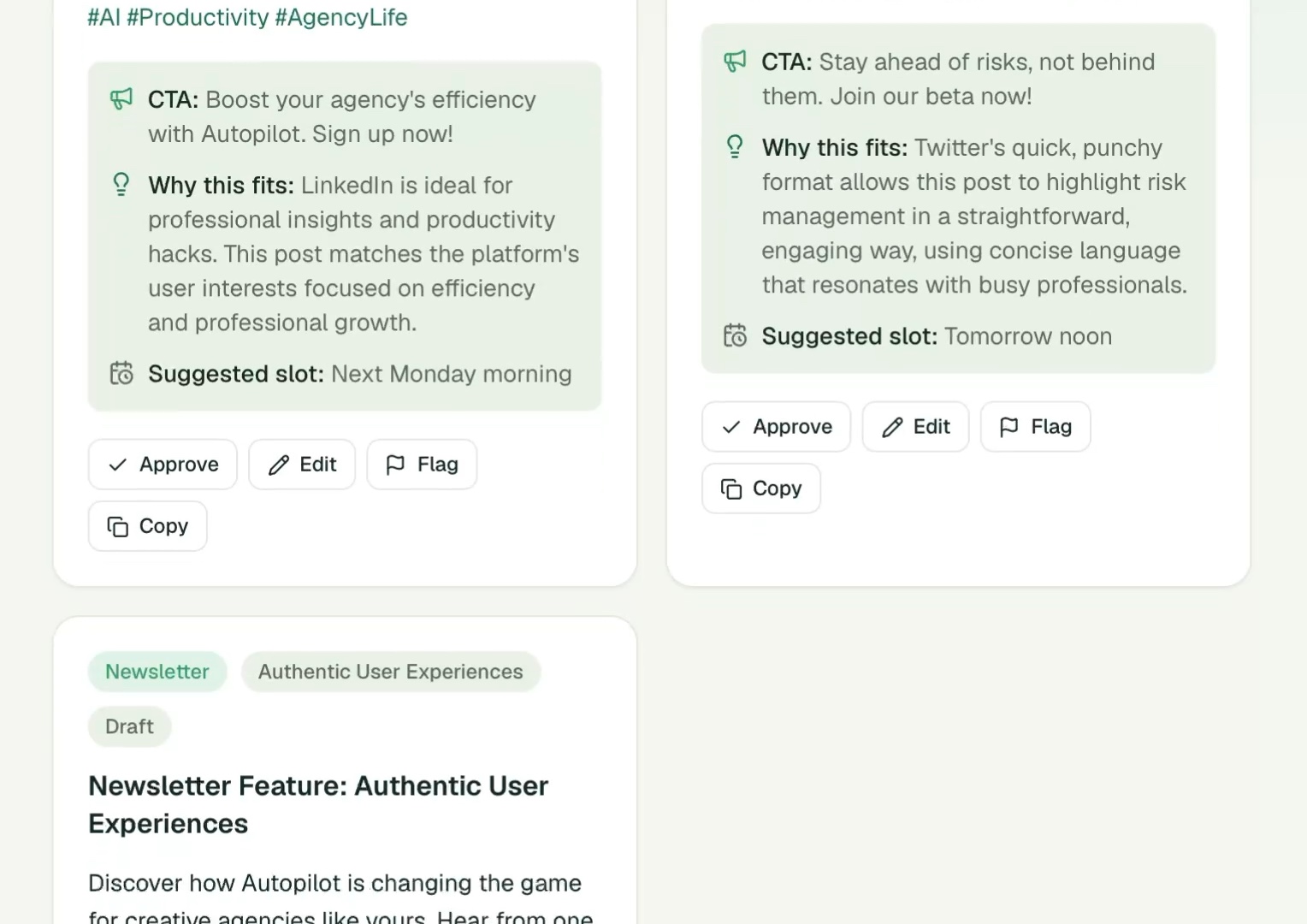
In Flowcraft, our campaign tool, a reviewer can check the drafts for each channel before anything goes out.
Campaign handoff
What we prepared for the food brand
Design guide
Existing logos, product photos, colors, and instructions for using them.
Social and email
Post graphics, swipe-through posts, Stories, and email layouts.
Website
A campaign landing page that uses the same artwork.
How this works
What you start with
The team approves a brief for the brand or for a new campaign.
What happens next
Collect the brand’s logos, product photos, and design references. Keep the originals and make a note of where they came from and how they can be used.
Write a guide to the design, tone, and checks so the team can use the same rules for the next job.
List the images and layouts the campaign needs. Use AI to make new images where it helps, and place the original logos and product art so details match.
Make the social posts, emails, landing-page art, and video plans. Check the product details, readability, and layout before handing over the selected work.
What you get
A folder of brand files, a guide for making new designs, and matched artwork for social posts, email, and the website.
What a person checks
The brand owner chooses a direction and approves the selected artwork. The team reviews storyboards as plans for the video.
Turn one report into posts people can use
We took one idea about meeting follow-up from Frontier’s November report. We turned it into a LinkedIn carousel that explains the idea and a short Story with an example someone can try.
What it does for your teamStart with research you already have and give each post one clear job.
Inside Frontier’s carousel: the meeting notes, decisions, and files to pull together before drafting a follow-up.
The opening slide asks who owns the next step after a meeting.The matching Story gives a one-line example with the task, the person responsible, and a due date.
How this works
What you start with
The team has an approved idea, report, or article to share in more places.
What happens next
Read the approved piece. Keep its tone, the main idea, and the facts and sources that support it.
Choose what suits each place you’ll share it. A LinkedIn post can explain the takeaway and a Story can show one quick example.
Write the captions and image descriptions. Check that the images and text fit each post.
Save the posts as drafts in the publishing tool. Open them again to check that the right text, images, and links saved.
What you get
Posts and articles ready to review, with the right images, captions, and links for each place they’ll appear.
What a person checks
The person who owns the channel checks the saved drafts and decides what to publish.
Train new teammates on real work
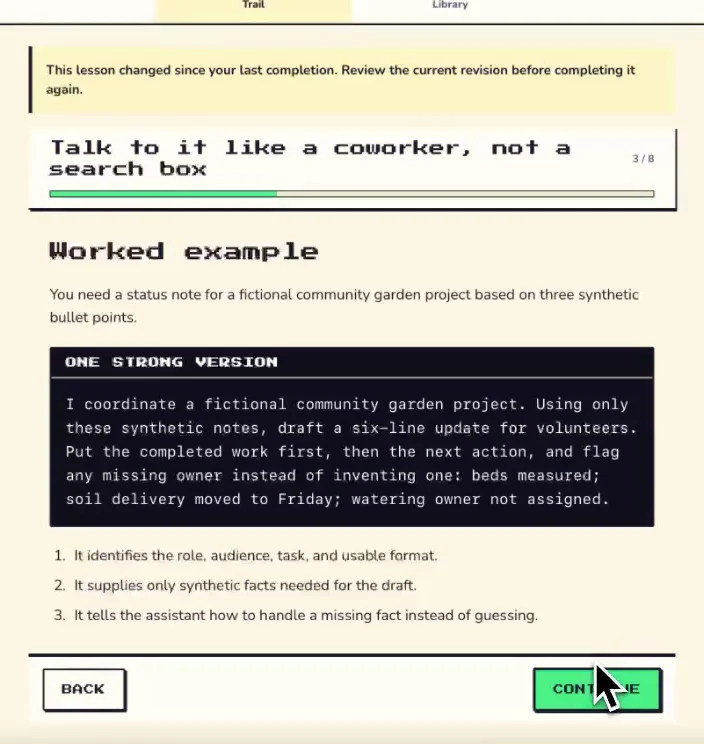
We built a training library with guides, practice tasks, and review checklists. Here’s how one lesson could help a new teammate use AI to write a client update from meeting notes.
What it does for your teamNew hires can practice before handling a real client. Their reviewer has a clear list of what to check.
See a worked example and the checklist learners can keep in Paper Trail, our AI training tool.
Practice assignment
Draft a client update
Meeting notes
The team picked a homepage draft. The revised quote needs to go out next.
Draft to review
We’ve chosen the homepage design. The next step is to send the revised quote.
Before sending
Confirm who is sending the quote and when. Both details are missing from the notes.
A 15-second practice assignment: read the notes, draft the update, and spot two details to check before sending.
How this works
What you start with
Someone new needs to learn a job your team repeats, or you want AI to help with part of it.
What happens next
Choose one job. Write down who does it, which tools they can use, and what they need to produce.
Pick current examples and rules the teammate has permission to use.
Write the steps, show a good result, and explain when to stop and ask for help.
Try a real task or a practice version. Use the result to fix confusing steps and update the guide when the work changes.
What you get
One tested guide with steps, useful examples, a practice task, and a checklist the team can keep current.
What a person checks
A teammate checks the finished work. Account and file access follow the team’s usual permissions.
Prepare the weekly report the same way each time
Save the sources, checks and layout for a recurring report so AI can use them as instructions for the next draft.
What it does for your teamSpend the review on what changed in the business instead of rebuilding the report every week.
Example report excerpt
Weekly orders and returns
What changed
Returns to the warehouse rose from the prior week.
Check before sharing
The orders export ends Thursday. Add Friday before comparing weekly totals.
Follow-up
Ask fulfillment which open orders are waiting for parts.
How this works
What you start with
The week or month ends, or a manager asks for a report.
What happens next
Pull the data from the tools you’ve given it permission to read. Record which tools and dates the report covers.
Check totals, units and dates, and flag missing data before comparing the figures.
Make charts and explain the changes that the numbers show.
Use your company’s report template and its writing and design rules.
Open the finished report and check the pages and charts. Flag any data problems a person still needs to review.
What you get
A report in your usual format with charts and a list of the sources and dates it covers.
What a person checks
A manager checks what the numbers mean, what information is missing and which version to share.
Turn a bid request into a checklist and draft
Give AI the bid documents and your usual instructions so it can find the required answers and prepare a draft for review.
What it does for your teamThe bid lead can see what is missing while there is still time to get it.
Example bid checklist
Office cleaning contract
Required evidence
Attach a current insurance certificate and client references.
Open question
Confirm which sites need weekend cover.
Before submitting
Get the bid lead’s approval on the scope and price.
How this works
What you start with
A buyer sends bid documents or a detailed request for a proposal.
What happens next
List the requirements, deadlines, submission instructions and proof the buyer asks for. Note where each appears in the bid documents.
For each requirement, check what your team can do, what proof you’re allowed to share and who will write the answer.
Write what you’ll deliver and what falls outside the job. Say how the buyer will check the work and what they need to provide.
Use the rates and figures your team approved for estimating. Flag open decisions about price or how to do the work.
Put the proposal draft, evidence checklist and open questions together for the person who leads the bid.
What you get
A draft proposal with a checklist of what the buyer asked for, the proof you have and the decisions still open.
What a person checks
The person who leads the bid decides whether to submit and approves the price, terms and claims before sending it.
Check incoming orders before entering them
Use your usual checks to pull the details from purchase orders and flag missing fields or possible duplicates for review.
What it does for your teamYour team can spend time on the orders that need judgment and trace each question back to the original document.
Example order review
Replacement filter order
Details pulled
Product code, quantity and requested delivery date.
Flagged
The order reference matches one already in the system.
Next step
Check the original order before entering another record.
How this works
What you start with
A purchase order, form or other document comes in.
What happens next
Pick out the details your team needs and keep a link to the original document.
Put dates, units and product codes in the format your team uses.
Check for missing details, duplicates and conflicts in the system you’ve made available.
Send unclear or incomplete records to a person. Show the issue and the part of the document they need to check.
Save or export approved records with links back to the originals. If a save runs again, reuse the same record ID to prevent a duplicate.
What you get
Records your team can use, with a list of items that need review and links to the original documents.
What a person checks
A person checks unclear values and approves exceptions that affect the record. They confirm any payment or agreement separately.
What we can help with
Open any service to see when it helps, what it looks like, and what you could get.
01Brand & writing rulesGive AI the writing rules and examples your team trusts.
When it helps
We collect your approved language, visual references, and strong examples into one set of instructions. The skill tells AI how to adapt the work for an email, a web page, or a social post and where to leave a decision for your team.
What it can look like
Start with one approved announcement. The skill uses your tone and format rules to prepare a shorter email and social draft. Your team checks the facts and voice before publishing.
Approved examples and references for each kind of output
A checklist for reviewing drafts before they go out
Flowcraft showing draft content prepared for different publishing channels.
02Reports & documentsGive repeat reports and documents a format people can check.
When it helps
We document which sources to use, what the finished report should include, and how to check dates, figures, and missing details. The same approach can guide recurring client updates, proposals, or paperwork reviews.
What it can look like
A manager needs a monthly review from several exports. The skill defines which totals to check, which charts to prepare, and how to show the source behind each important figure.
A report template with the required sections and sources
Instructions for checking data and handling missing information
A worked example and a final review checklist
Cover of Frontier Research’s AI & Business report for November 2026.
03Team playbooks & trainingPut one recurring job into a guide your team can practice.
When it helps
We work with the people who already do the job to capture the steps, the usual exceptions, and what good work looks like. The guide gives people and AI the same instructions and makes it clear when to ask for help.
What it can look like
A new team member practices turning a set of project notes into a client update. They can compare their result with an approved example, check what they missed, and try the task again.