
Frontier Research · Issue 01
AI & Business November 2026
A visual research briefing for business owners, founders, professionals and marketing teams.
Download the PDF
About this report
About this report
AI tools change quickly. This monthly Frontier Research briefing explains the updates worth understanding, what people are doing with them, and where they could fit into your work.
Who it is for
Business owners, founders, professionals and marketing teams who want to understand AI without needing a technical background.

About Frontier Research
Frontier Research helps businesses decide what to improve, build useful websites and tools, and coach their teams to use them.
This report brings that practical focus to AI: explaining new developments through the work people need to get done.
Explore our work
See how we help businesses with websites, everyday work and AI.
Learn more atfrontierresearch.xyz
Abstract
AI updates for everyday work
This report looks at selected AI updates and research published from 9 October to 8 November 2026. It explains what the changes do and where they may matter in everyday work.
The question
Which recent changes could help a business with office work, marketing content or finding customers?
How we researched it
We reviewed original product announcements, a website-traffic study, a business survey and four public accounts. This is a review of published sources.
The main findings
Google added ways to connect office tasks and make longer AI video clips. In one website study, AI assistants sent far fewer direct visits than unpaid Google search. S02 S03 S05
Our conclusion
The updates create options for specific tasks. Check your existing software first, then compare a relevant feature with the way your team does that work today.

Executive summary
What’s worth testing
An AI update is worth your attention when it helps with a task your team already does. This month’s findings concern office follow-ups, marketing video and where website visitors come from.
Check your existing software
Google added features for finding documents and preparing follow-ups. If your team uses Google’s business apps, check whether those features address work you still do manually. S02
Consider a specific content task
Google’s updated video system makes longer clips and accepts further edits. A marketing team could assess it on a short product clip, including the work needed to fix it. S03
Measure where inquiries come from
One study found much less direct traffic from AI assistants than from unpaid Google search. Check your own visits and inquiries before changing your marketing priorities. S05
Research question and scope
Where AI fits into the work
A tool that drafts a follow-up email solves a different problem from one that makes a video. We grouped this issue around three areas so you can see which changes apply to your team.
Office work
After a meeting, someone may need to collect the notes, find a document and write a follow-up. Can software help prepare those steps?
Content production
A marketing team may want a short product clip. What can the updated video system make, and what still needs checking?
Customer discovery
A business may hear that customers are moving to AI search. What do the available website-traffic figures actually show?
Finding 1: office work
From meeting notes to follow-up
After a meeting, a team member might copy the notes, find a useful document and draft an email. Google’s October update adds features that can connect more of that work inside its business apps.
Meeting notes
Start with the meeting details.
Find a document
Look up relevant material.
Prepare a draft
A person checks the follow-up.
Where Workspace Studio fits
Google Workspace is the business suite that includes Gmail, Docs and Drive. Workspace Studio lets a team set up a sequence of tasks across those apps. S12
What Google added in October
The update adds document search, rules for choosing the next step, and more meeting details for follow-up drafts. It can also avoid starting a sequence again for every email reply. S02
Rollout began 13 October 2026. Access depends on Workspace Studio availability and company settings. Source: Google’s announcement.
Product evidence: the Google example
A follow-up in Google Chat
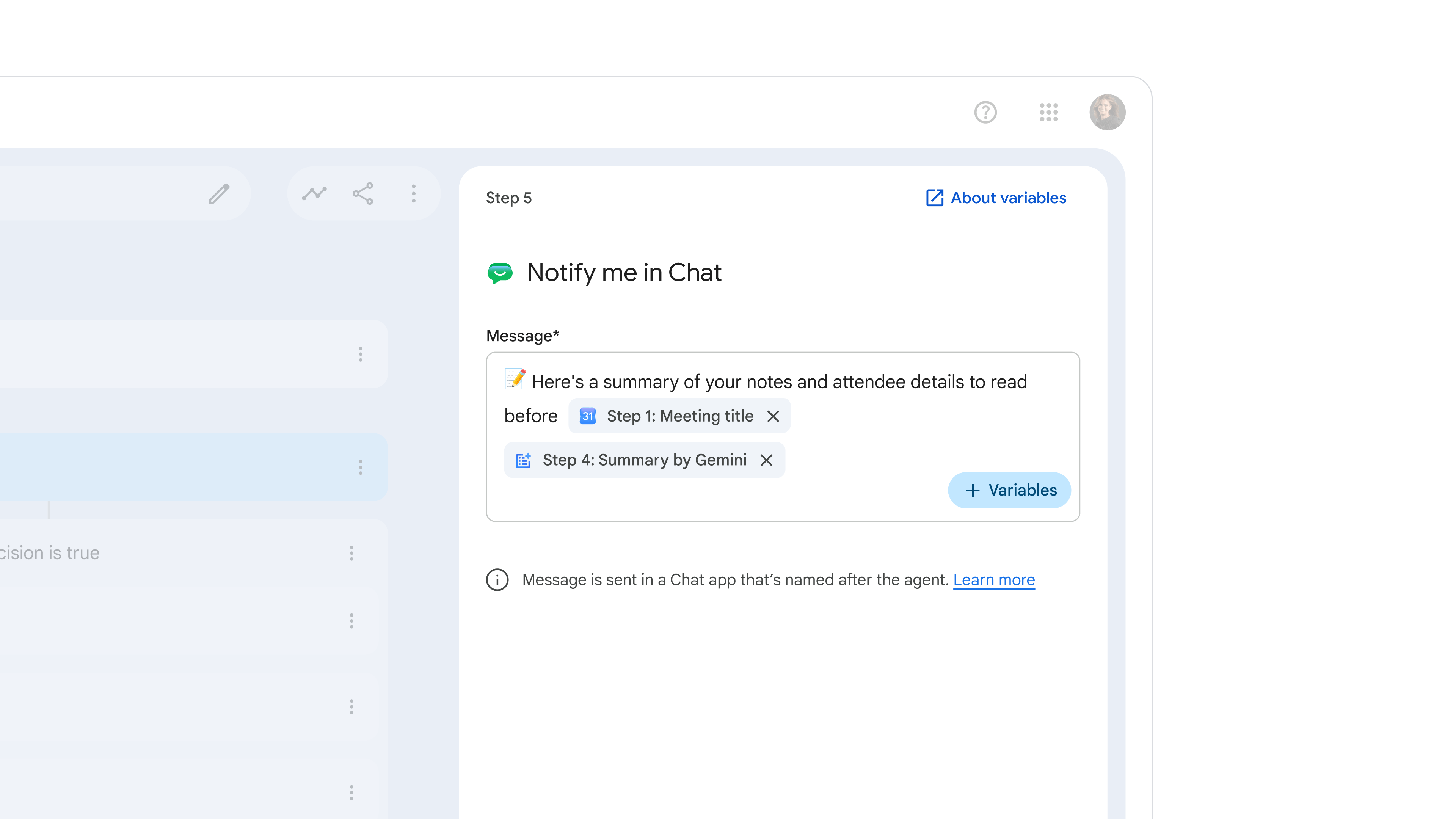
Google’s example below prepares a message for Google Chat, its team messaging app. It combines a meeting title with a summary written by Gemini, Google’s AI assistant.
Meeting title
The team inserts the meeting title collected in an earlier step, so it does not have to be typed into this message again.
AI-written summary
The summary is inserted into the message too. A person still needs to check whether it describes the meeting correctly.
Finding 2: marketing video
Google’s AI video clips get longer
AI video tools turn instructions and reference images into short clips. A marketing team might use one to try a product-video idea. Google announced new capabilities for its Gemini Omni video system on 5 November.
Maximum clip length

Follow-up edits
Ask for a change to the clip through a follow-up instruction.
One 15-second generation
The charge for creating the clip at Google’s announced HD rate, before retries or editing.
Google offers the system to software developers. Calculation: 15 seconds × $0.07. A finished video tool may charge differently; the clip-creation charge excludes retries and editing. S03
Finding 3: AI and website traffic
How much traffic came from AI?
When someone clicks a website link in an AI assistant such as ChatGPT, the site may record where that visit came from. Marie Haynes compared those visits with traffic from unpaid Google search across 100 selected websites.
Website visits relative to unpaid Google search
ChatGPT is included within the all-assistants total.
100 websites; 12 months; more than 145 million sessions. Unpaid Google-search visits are set to 100; each other number is relative to that baseline.
How to use this finding
Check where your own visits and qualified inquiries come from before moving time or budget toward being mentioned by AI assistants.
How a visit gets counted
These figures track visits arriving through links. A customer who reads an AI answer and visits later can appear under a different traffic source.
Background: AI use in small businesses
How surveyed businesses use AI
Using AI might mean asking it to draft an email. Building it into daily operations means it becomes part of how the business runs. An October survey distinguishes those levels of use within one business-program community.
Reported using AI
Built it into core operations
Who answered
The 2,473 respondents were past participants in Goldman Sachs’s small-business program, surveyed in August 2026.
What we learn from the gap
Many more respondents reported using AI than fully integrating it. Trying a tool for an occasional task and relying on it for a regular process are different levels of use.
Market listening: selecting and checking work
What people say about using AI
Product announcements explain features. Public posts can show the questions people face while trying to use them. These two accounts discuss choosing sales leads and checking AI-written work. An AI agent is software set up to carry out steps toward a task.

“lead quality matters way more than lead quantity”
An agency owner says they decide what makes a business worth approaching before using AI to research it.
“When does reviewing an AI agent’s work become more work than doing it yourself?”
A marketing practitioner asks whether checking claims and rewriting drafts can use up the time AI appears to save.
The practical questions: how will you choose the work AI handles, and how much checking will the result need?
Market listening: marketing quality
What makes AI content usable?
Making content quickly is useful only if the finished work is good enough for its purpose. These two accounts question the quality and usefulness of AI-assisted marketing work.
“Are we all just accepting lower quality because AI made content so cheap?”
The writer asks whether low production costs are making marketers more willing to accept imperfect work. That is a personal perspective, not evidence of what customers will accept.
“The results were underwhelming.”
The author describes an attempt to automate marketing work. The collected post gives too little detail to judge what was tried or why it disappointed them.

Business implications
Which updates fit your team?
You do not need to investigate every AI launch. Start with work that already takes time or creates problems, then ask whether one of these findings addresses it.
Office teams
If your team already uses Google’s business apps, check whether the new features can prepare a follow-up you currently write by hand.
Marketing teams
If you need short product clips, compare an AI-assisted attempt with your current process. Count retries and editing, and check that the product looks right.
Owners deciding where to market
If you are deciding where to spend marketing effort, look at visits and qualified inquiries from your own channels. The website study is context for that decision.

Recommendations: measure the finished job
Measure the whole job
An AI draft may arrive quickly and still need checking or rewriting. To find out whether it helps, compare the total work involved with the way your team completes the same task today.
Prepare
Gather the approved facts.
Draft
Create the first version.
Review
Check and correct it.
Give the trial a clear standard
- Keep an example of work you would be happy to use.
- Choose the person who will check the result and handle mistakes.
- Decide what improvement would make the change worth keeping.
Record the preparation, retries, corrections and staff time. That gives you something concrete to compare, rather than judging the tool by its first draft.
Conclusion
Choose one task to test
Google’s office-software update is a reason to check tools you already pay for. A feature added to an existing subscription may cover work your team still does by hand.
Choose a familiar task, such as a meeting follow-up or a short product clip. Compare the finished result with your current process, including preparation, checking and corrections.
For marketing decisions, compare your own website visits and customer inquiries with the research. The public accounts also suggest questions to ask about quality and review effort.
A useful next step
Review one existing tool and one task it could help with. Keep the change if the finished work is useful and the overall effort makes sense.
Sources
Sources
Linked references for the findings, product image and quoted accounts
Goldman Sachs / Babson · October 2026
Google Workspace Updates · 9 October 2026
Google · 5 November 2026
Marie Haynes · 21 October 2026
Google Workspace · Accessed 8 November 2026
u/Intelliseapp · Reddit · 3 November 2026
r/DigitalMarketing · 3 November 2026
u/RainbowFatDragon · Reddit · 6 November 2026
@Irewole_ · X · 6 November 2026